Vicente Louvet III
GitHub Action CI/CD workflow Setup Guide
Continuous deployment to a Docker container, protected by Tailscale, and powered by GitHub
 Introduction: The content of this guide is purely for educational purposes and comes with no warranty whatsoever.
The steps below outline the process of setting up a development workflow that deploys changes to a simple app running on docker.
The docker architecture is a very simple two container setup.
First, a simple Python Flask app is created as an example - then an NGINX container is used to proxy requests.
This architecture allows the user to quickly integrate HTTPS, load balancing, and other features provided by NGINX.
The hope is to push changes to the app quickly, without having to expose the host (hypervisor) to the public internet.
Section 1: Installing Pre-Requisites
- A GitHub account with GitHub Actions enabled
- A GitHub repository - to store app source code, workflow files, and authentication credentials
- A GitHub API token with workflows permission
- Development server running ssh server, and connected to tailscale.
- required packages/services:
- openssh-server
- docker-compose
- git
GitHub Setup
- Create an account at https://www.github.com, a personal account is free.
- Once logged into GitHub, create a new repository, give it a short meaningful name.
- Generate a GitHub API Token, store it in a secure place such as a password vault.
- Grant the API token workflow permissions, and grant it full access to the repository you created.
TailScale setup
- Download and install tailscale on the development server, which will host the docker container(s).
- Follow the instructions here TailScale Linux Download
-
Authenticate into your tailnet from the development server.
sudo tailscale login -
Then, once authenticated, query and record the tailscale IP of the development server
sudo tailscale status - Tailscale Admin: Disable expiry for development server/hypervisor.
- This is a matter of convenience, not recommended for security purposes.
- Tailscale Admin: Generate and store a TailScale Auth Key.
- Tailscale Admin -> Settings -> Personal Settings -> Keys
- make sure to store this auth key in a secure place such as a password vault.
- Copy tailscale auth key into GitHub as a Repository secret.
- Navigate to Repo -> Settings -> Security -> Secrets and Variables -> Actions.
- Create secrets for TAILSCALE_AUTHKEY, SERVER_IP and copy values from password value into each secret.
Section 2: Dev server setup
-
Create a development user
sudo adduser devuser -
switch into the development user account with su man su
sudo su devuser -
Add the development user to the appropriate groups with usermod man usermod
sudo usermod -aG docker devuser -
Generate SSH key for developer user with ssh-keygen man ssh-keygen
ssh-keygen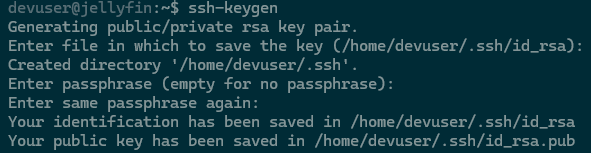
-
copy SSH key to GitHub as repository secret
Section 3: Docker Compose setup and configuration
- example docker compose file
- example dockerfile
Section 5: Github Action: workflow file setup, and testing
- defining a github action workflow.yml file
- referencing github secrets in workflow file
Section 6: Additional Resources and follow up reading
- where do we go from here?